> ## Documentation Index
> Fetch the complete documentation index at: https://docs.doko-ai.com/llms.txt
> Use this file to discover all available pages before exploring further.
# How do credits work?
> Learn how your chatbot credits work, when they are consumed, and how to manage their use efficiently to optimize your customer interactions.
## What are credits?
Credits are the consumption unit that your chatbot uses to process and respond to messages. Each interaction with your chatbot consumes credits based on the complexity of the query and the amount of information processed.
Every time a user asks the chatbot something, **1 credit** is consumed. You can monitor your credit consumption from the dashboard to maintain control over your usage.
## When are credits consumed?
Credits are automatically consumed in the following situations:
Every time your chatbot responds to a user's message, 1 credit is consumed.
For each message sent to a user in a marketing campaign or for each abandoned cart message
## Credit usage examples
Below, we show you examples of real conversations to understand how credits are consumed:
**User:** Do you have sports shoes?\
**Chatbot:** Hello! Yes, we have a wide variety of sports shoes. What type of activity are you going to do?\
**💳 1 credit consumed**
***
**User:** For running\
**Chatbot:** Perfect, we have specialized models for running. What size do you need?\
**💳 1 credit consumed**
***
**📊 Total: 2 credits consumed**
**User:** Hello, do you have t-shirts available?\
**Chatbot:** Hello! Yes, we have several t-shirts available. What type of t-shirt are you looking for?\
**💳 1 credit consumed**
***
**User:** I want a black t-shirt size M\
**Chatbot:** Perfect, we have black t-shirts in size M. The price is 25 dollars. Would you like to see more details?\
**💳 1 credit consumed**
***
**User:** How much does shipping cost?\
**Chatbot:** Standard shipping costs 5 dollars and takes 3-5 business days. We also offer express shipping for 10 dollars with 24-hour delivery.\
**💳 1 credit consumed**
***
**📊 Total: 3 credits consumed**
**User:** Good afternoon, I want information about laptops\
**Chatbot:** Good afternoon! Of course, we have several laptop options. What will you use it for?\
**💳 1 credit consumed**
***
**User:** For work and graphic design\
**Chatbot:** Perfect, I recommend our laptops with Intel i7 processor and dedicated graphics card. What is your budget?\
**💳 1 credit consumed**
***
**User:** Between 800 and 1200 dollars\
**Chatbot:** We have 3 models in that range. Would you like me to send you the specifications of each one?\
**💳 1 credit consumed**
***
**User:** Yes, please\
**Chatbot:** Here are the options: Model A - 899 dollars, Model B - 1099 dollars, Model C - 1199 dollars. Which one interests you most?\
**💳 1 credit consumed**
***
**User:** Does model B have a warranty?\
**Chatbot:** Yes, all our products include a 1-year warranty. Would you like to proceed with the purchase of Model B?\
**💳 1 credit consumed**
***
**📊 Total: 5 credits consumed**
As you can see, each question or message from the user generates a chatbot response and consumes **1 credit** per interaction. The total number of credits depends on the number of questions the user asks.
## Credits for campaigns
In messaging campaigns, **for each person who receives a message, 1 credit is consumed**. This means that if you send a campaign to 100 contacts, 100 credits will be consumed.
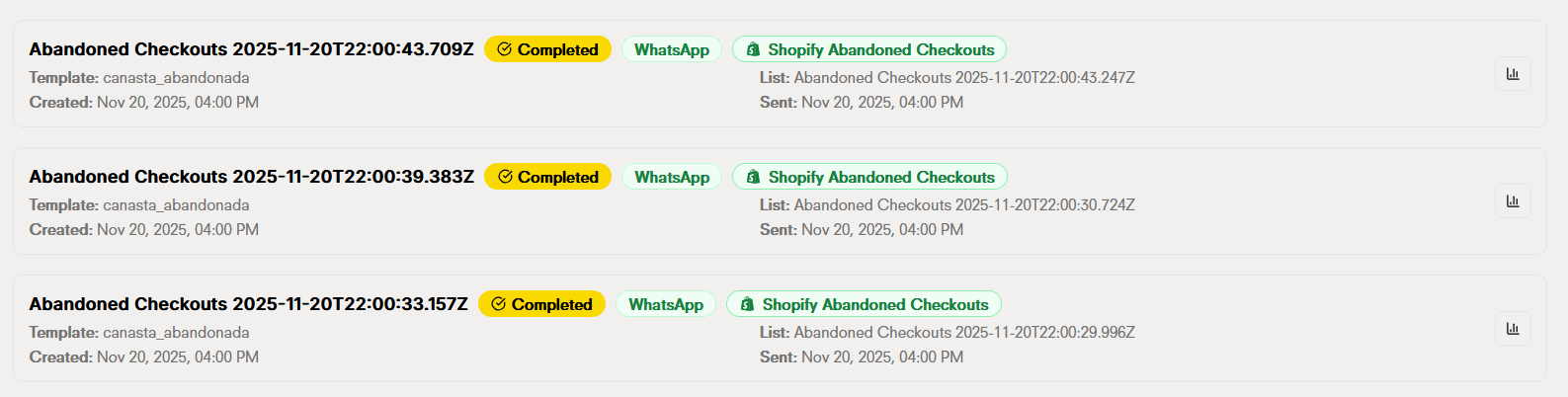
The same applies to **[abandoned carts](./conf-shopify)**: for each message sent to a customer about their abandoned cart, **1 credit** is consumed.
 ## Chatbot credit usage
**Location**: Dashboard → Settings → Usage
In the usage panel you can view relevant information about your credit consumption:
* **Billing period**: Shows the start and end dates of your current period. This helps you know when your credits renew and how much time you have left in your current plan.
* **Plan consumption**: Indicates how many credits you have used and how many credits you have left available in your current plan.
* **Extra questions used**: Shows the number of questions that have been processed after exhausting your plan's credits. These extra questions generate additional charges, so it's important to monitor this number to maintain control of your expenses.
## Chatbot credit usage
**Location**: Dashboard → Settings → Usage
In the usage panel you can view relevant information about your credit consumption:
* **Billing period**: Shows the start and end dates of your current period. This helps you know when your credits renew and how much time you have left in your current plan.
* **Plan consumption**: Indicates how many credits you have used and how many credits you have left available in your current plan.
* **Extra questions used**: Shows the number of questions that have been processed after exhausting your plan's credits. These extra questions generate additional charges, so it's important to monitor this number to maintain control of your expenses.
 The **credit control switch** is a security tool that allows you to prevent the chatbot from responding when you no longer have credits available.
When you activate this switch and your account runs out of credits, the chatbot **will automatically stop responding** to user queries. This prevents additional credits from being consumed and, consequently, **prevents charges for extra questions** that could be generated if the chatbot continued to function without credits.
**How does it work?**
* **Switch activated**: The chatbot automatically deactivates when credits run out, protecting your account from unexpected consumption.
* **Switch deactivated**: The chatbot can continue responding even without credits, which will generate additional charges.
The **credit control switch** is a security tool that allows you to prevent the chatbot from responding when you no longer have credits available.
When you activate this switch and your account runs out of credits, the chatbot **will automatically stop responding** to user queries. This prevents additional credits from being consumed and, consequently, **prevents charges for extra questions** that could be generated if the chatbot continued to function without credits.
**How does it work?**
* **Switch activated**: The chatbot automatically deactivates when credits run out, protecting your account from unexpected consumption.
* **Switch deactivated**: The chatbot can continue responding even without credits, which will generate additional charges.
 ## Doko plans for chatbot credits
Doko offers different credit plans adapted to your business needs. Choose the plan that best fits the volume of interactions you expect to have with your customers.
| Plan | Credits included | Ideal for |
| ---------------- | ---------------- | ------------------------------------------------------- |
| **Basic** | `1,000 credits` | Small stores or businesses that are just starting |
| **Entrepreneur** | `5,000 credits` | Growing businesses with moderate traffic |
| **Professional** | `12,000 credits` | Established companies with high query volume |
| **Enterprise** | `65,000 credits` | Large companies with multiple channels and high traffic |
Discover all the details of our plans, prices and features. Find the perfect plan for your business and start optimizing your customer interactions.
## WhatsApp Business pricing
It's important to understand how the WhatsApp Business billing system works to efficiently manage your messaging costs.
Access the official WhatsApp Business pricing calculator to know the exact rates according to your country, message category and sending volume.
## Doko plans for chatbot credits
Doko offers different credit plans adapted to your business needs. Choose the plan that best fits the volume of interactions you expect to have with your customers.
| Plan | Credits included | Ideal for |
| ---------------- | ---------------- | ------------------------------------------------------- |
| **Basic** | `1,000 credits` | Small stores or businesses that are just starting |
| **Entrepreneur** | `5,000 credits` | Growing businesses with moderate traffic |
| **Professional** | `12,000 credits` | Established companies with high query volume |
| **Enterprise** | `65,000 credits` | Large companies with multiple channels and high traffic |
Discover all the details of our plans, prices and features. Find the perfect plan for your business and start optimizing your customer interactions.
## WhatsApp Business pricing
It's important to understand how the WhatsApp Business billing system works to efficiently manage your messaging costs.
Access the official WhatsApp Business pricing calculator to know the exact rates according to your country, message category and sending volume.